
A Photobooth Online DigiBouquet for Your Girlfriend
A meaningful digital gift does not need to feel formal. This photobooth online DigiBouquet brings together the fun of taking a new picture and the tenderness of writing something only she should receive.
Instead of uploading an old picture and stopping there, you can take a fresh portrait, give it a playful frame, and place it beside a message written for one person. The result feels less like a template and more like a small moment you made together.
More Than An E-card
Why a photobooth online picture changes the whole gift.
A normal digital card asks the message to do all the emotional work. A DigiBouquet can hold several kinds of attention at once: the flowers establish the mood, the photograph brings her into the scene, and your words make the page unmistakably private.
The Photo Booth is especially useful when you want the picture to feel connected to the gift. Filters, borders, and the countdown are not just effects; they help you make a photograph with the same tone as the bouquet. A soft frame can feel romantic, while a birthday border can make the surprise cheerful before she reads a single line.
Take it now
A new photo feels more intentional than a picture pulled from an old camera roll.
Match the mood
Choose a filter and border that belong with her personality and the bouquet.
Make it hers
Pair the portrait with her name, your shared memory, and a personal sign-off.
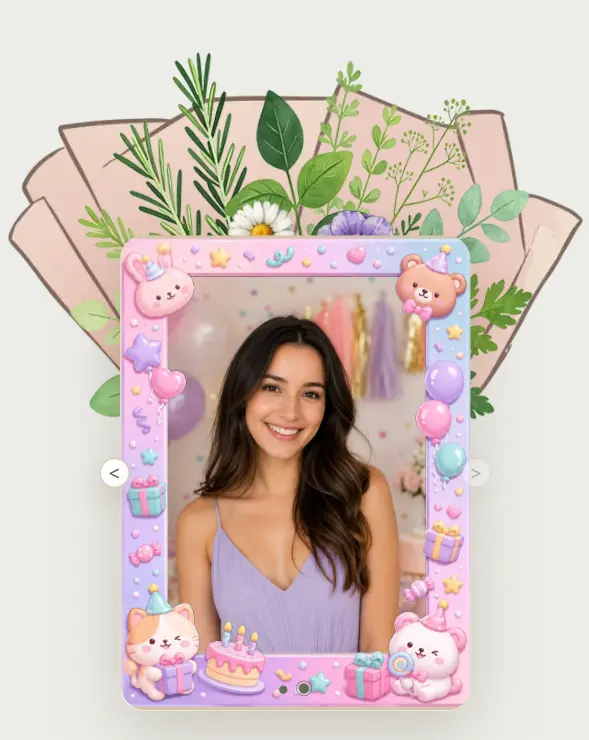
A Photo Made In The Moment
Let the Photo Booth show her playful side.
This example uses a soft pink birthday frame around a relaxed portrait. The frame adds celebration, but the face remains the focus. That balance matters: a photobooth online effect should give the picture a feeling, not hide the person inside it.
Use the three-second timer when she is posing by herself, or set up the camera so both of you can be in the shot. Try a warm filter for an affectionate look, a classic black-and-white treatment for an anniversary, or a fun frame when the gift is meant to make her laugh first.
A useful rule: choose the photograph she would be happy to keep, then use the filter and frame to support it.
Make The Gift
How to create a photobooth online DigiBouquet for her.
Build a bouquet around her taste
Start with flowers and greenery that feel like her. Romantic does not have to mean red roses; soft color, bright birthday flowers, or a quieter natural arrangement can be more personal.
Write the message before adding effects
Use her name, name the occasion, and include one true detail from your relationship. A specific sentence will carry more feeling than a long collection of generic compliments.
Open Add Photos and choose Photo Booth
Allow camera access, select a filter and border, choose Off, 3S, or 5S for the countdown, and take the picture. Retake it until the expression feels natural.
Preview the complete DigiBouquet
Check the photograph beside the bouquet and message. Add music or a voice note only when it strengthens the mood, then create the private share link for her.
The Personal Part
Write the part only she could receive.
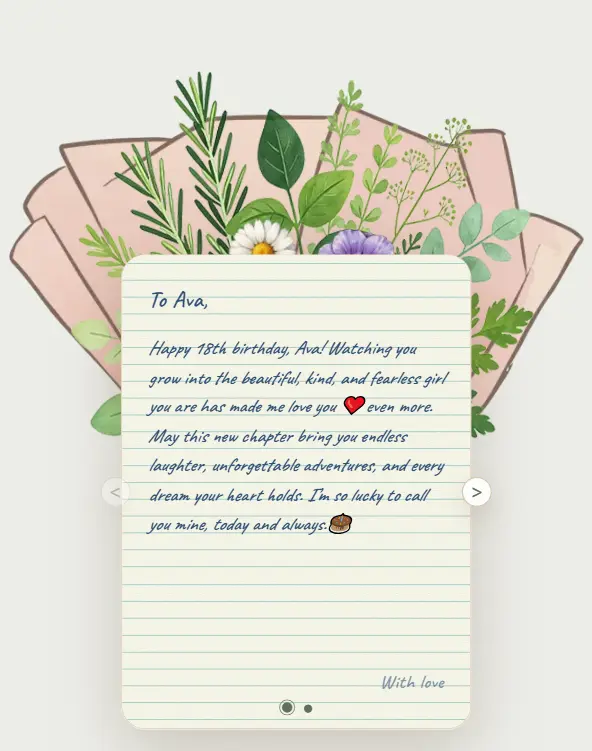
The example DigiBouquet opens with a birthday letter for Ava. Her name appears first, the message recognizes who she is becoming, and the note ends with a simple promise of affection. Those details make the decorated portrait feel like part of a relationship rather than a generic birthday graphic.
Write in the way you actually speak to your girlfriend. Mention the nickname, memory, private joke, or hope that would make her recognize you before she reaches the signature.
Message idea
“Happy birthday, Ava. I love the brave, beautiful person you are becoming. Thank you for making ordinary days feel like memories I want to keep. I am so lucky to love you.”
Replace the example name and sentiment with details from your own relationship. The best message should sound like you, not like a greeting card.
Create Her Surprise
Turn one new photo into a DigiBouquet she can keep.
Choose the bouquet first, write your private message, then use Photo Booth when you reach the card step. Your camera preview stays on your device, and only the photograph you choose is added to the gift.